> ## Content Index
> Fetch the complete content index at: https://blogs.remobjects.com/llms.txt
> Use this file to discover other available public pages before exploring further.
# Service Tester Now Handles Every Type You Have
- URL: https://blogs.remobjects.com/2026/10/21/service-tester-now-handles-every-type-you-have/
- Published: 2026-10-21T07:52:28.000Z
- Updated: 2026-10-21T07:52:28.000Z
- Author: Artem Vuitsyk
*Every Remoting SDK type now works inside a structure. And every field has a proper editor.*
You add a method to your server. Now you want to see what it returns.
So you start a new project. You generate the proxy, drop a form on it, add two buttons and a memo, and run it. All of that, just to see what one method returns. Then the method changes, and you do it again.
Service Tester is the tool that saves you from all that. You connect it to your server, press Load RODL, pick a service and an operation, fill in the parameters and press Run Once. It ships with Remoting SDK and Data Abstract for .NET and for Delphi, it costs nothing extra, and it has never needed a single line of client code.
This release does two things: it gives every parameter an editor that matches its type, and it stops caring how deep your structures go.
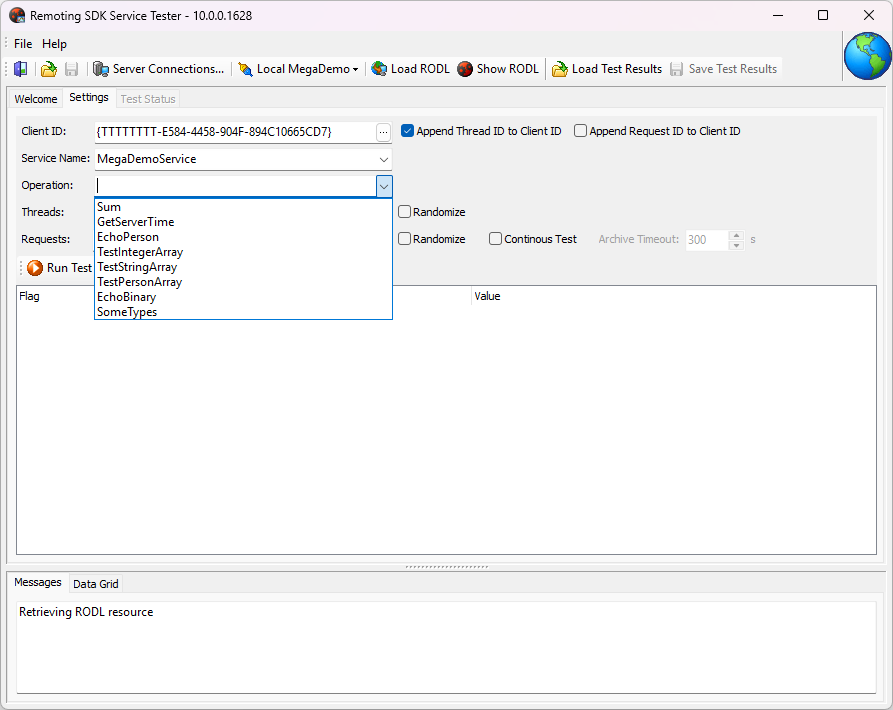
**Pick a server, press Load RODL, and every method is right there.*
# Every type gets its own editor
Pick an operation, and the grid fills up with its parameters. Every one of them now opens the editor that its type deserves.
• An **enum** is a drop-down built from your RODL. Only the values your server declares are in the list.
• A **date** opens a calendar.
• A **GUID** cell carries a mask, so the braces and the dashes are already in place.
• An **XsDateTime** opens with the time zone offset as a field of its own, because that offset is part of the value.
• A **binary** field loads from a file, and saves the response back to a file.
• **Xml** and long strings open in a window of their own, not a one-line cell.
• An **array** is a list you add items to and remove them from.
The tester reads your RODL and hands you the right editor for every field. A value that does not fit the type is no longer something you can type.
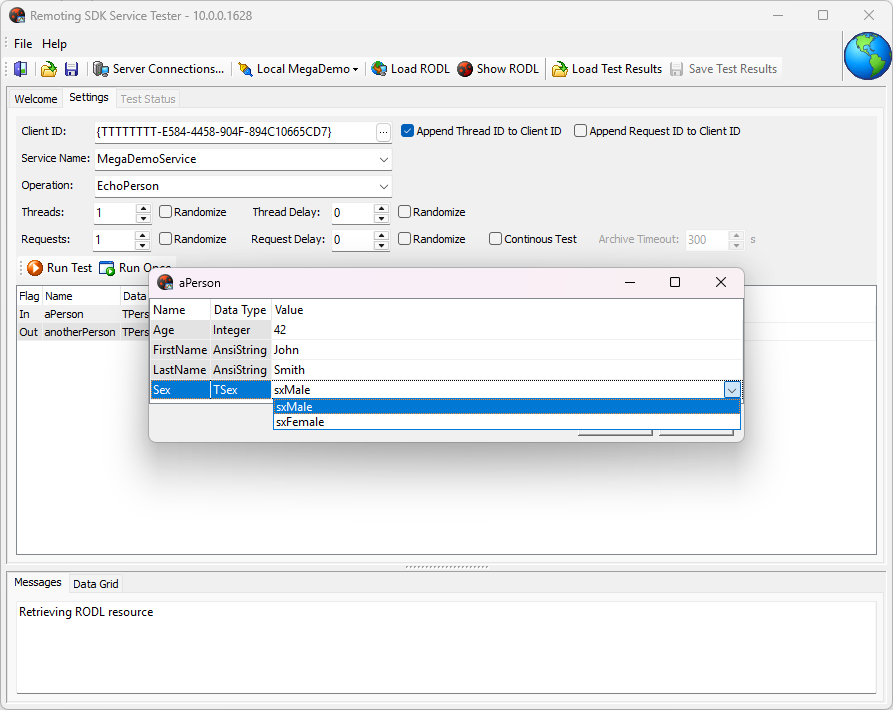
**The enum values come from your RODL. There is nothing left to spell wrong.*
# A proper editor for every value
Some values are too big for a grid cell. Double-click a parameter and it opens in a window of its own, with room to see what is really in there.
A binary field opens as a hex view, with offsets down the left and an ASCII column on the right. Right-click gives you Copy, and the choice of 4, 8, 16 or 32 bytes per line — whichever suits your format.
Three buttons across the top:
• **Load** reads a file into the field.
• **Save** writes out exactly what you see, byte for byte.
• **Clear** empties the field to zero bytes - which is not the same as nil, and your server knows the difference.
*Text* and *Xml* open the same way, with the same buttons.
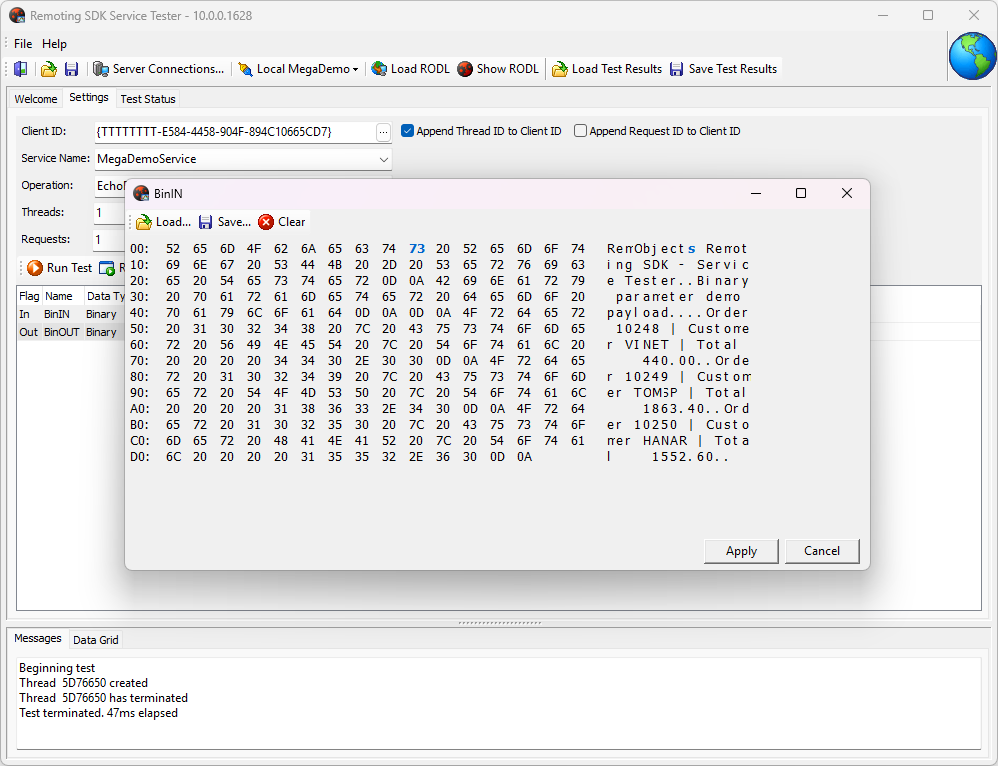
**Sixteen bytes per line, offsets, ASCII. Save writes back exactly what you see.*
# Wrong input is refused, not silently fixed
This is the change we like most.
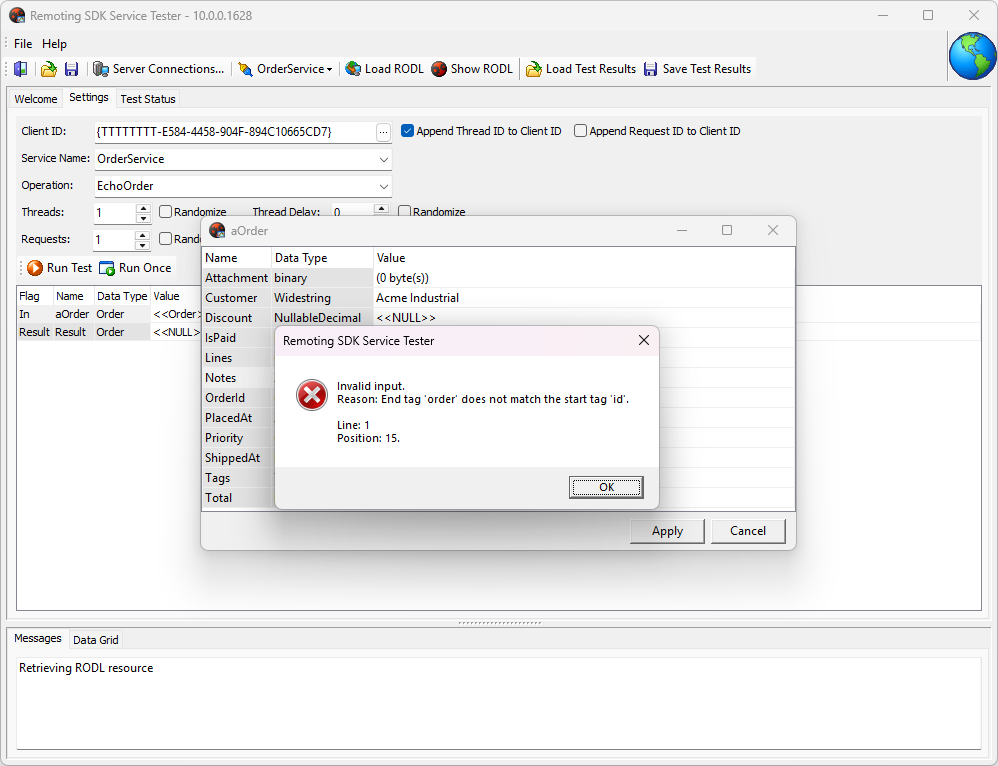
**Broken Xml is refused, with the reason and the exact position.*
An Xml value is parsed before it is accepted. Hand the field something that is not valid Xml, and the tester refuses it, names the problem and points at the place:
```txt
Invalid input.
Reason: End tag 'order' does not match the start tag 'id'.
Line: 1
Position: 15.
```
That tells you what to fix, and you get it while you are still looking at the field.
Without that check the value quietly becomes nil, the tool reports success, the server returns nonsense, and you go looking for the fault everywhere except where it is.
# Every type now works inside a structure
This is the big one.
Decimal, Guid, Xml, XsDateTime and all eight nullable types now work as fields of a structure, going out to the server and coming back. A structure can also hold an array of other structures, and the values inside those travel too.
Look at that list again. It is money, identity, documents and timestamps. Most business applications are built out of exactly these — and until this release, a method that took a structure with a Decimal inside was a method Service Tester could not help you with.
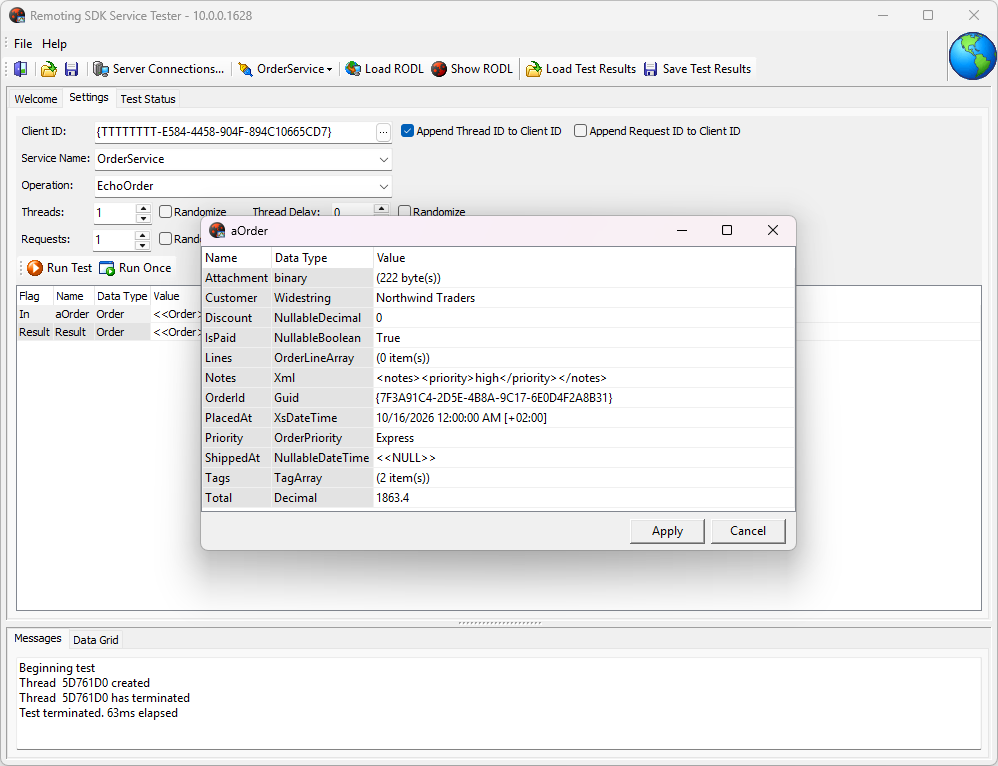
**One structure with one field of every type that used to be impossible to send.*
Press **Run Once**, and here is what the server received:
```txt
OrderId = 7f3a91c4-2d5e-4b8a-9c17-6e0d4f2a8b31
Customer = "Northwind Traders" (17 chars)
Total = 1863.4
PlacedAt = 2026-10-16 00:00:00 offset +02:00
Notes = high
Discount = 0
ShippedAt = nil
IsPaid = True
Priority = Express
Attachment = 222 byte(s)
Tags = 2 item(s)
```
The decimal keeps its scale, the time zone offset is still there, the Xml arrived as Xml, and the binary is the same 222 bytes that went in. Not one line of client code was written to get that.
# Nesting has no limit
A structure that holds another structure. An array of those. Each of them holding a structure of its own. Business contracts look like this all the time, and until now that was where the tester stopped being useful.
The tester reads your RODL and follows it as deep as it goes.
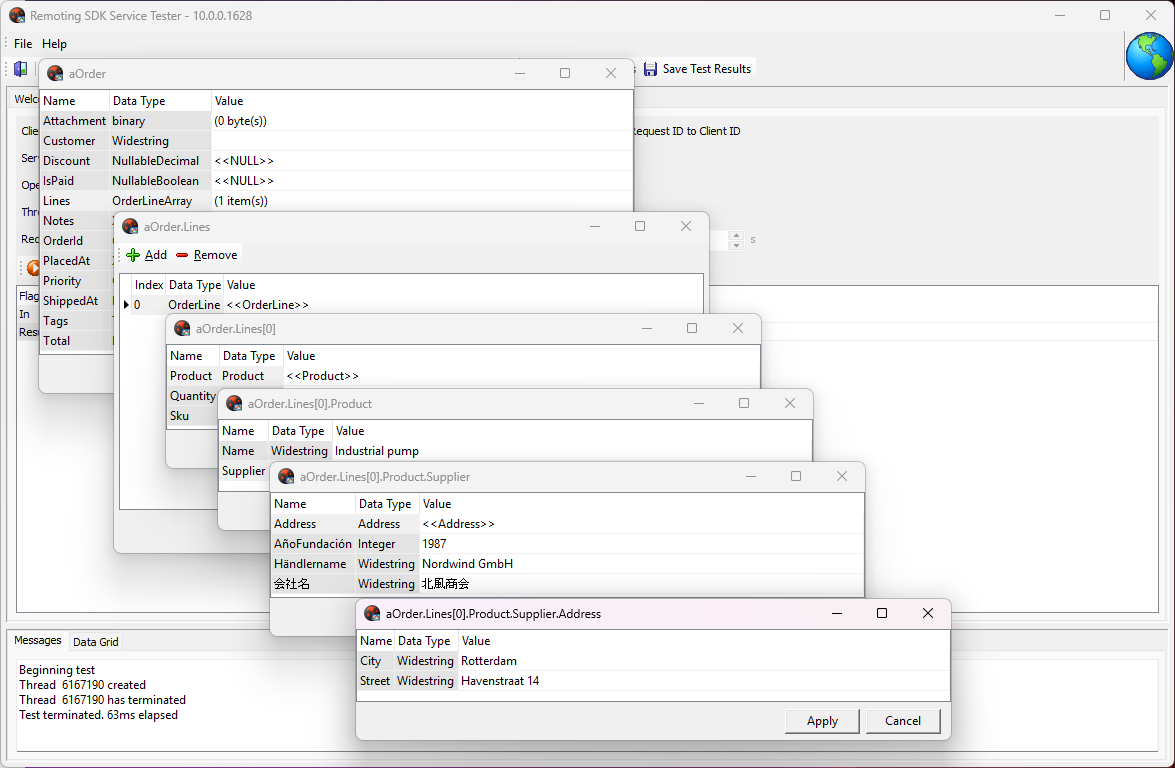
**Every level of the structure opens in an editor of its own.*
In the demo above the chain runs Order → Lines → OrderLine → Product → Supplier → Address. You open each level the same way you opened the first one, you fill in what you need, and the whole tree goes to the server in one call:
```txt
Lines[0].Sku = "SKU-4417"
Lines[0].Quantity = 12
Lines[0].Product.Name = "Industrial pump"
Lines[0].Product.Supplier.Händlername = "Nordwind GmbH"
Lines[0].Product.Supplier.AñoFundación = 1987
Lines[0].Product.Supplier.会社名 = "北風商会"
Lines[0].Product.Supplier.Address.City = "Rotterdam"
Lines[0].Product.Supplier.Address.Street = "Havenstraat 14"
```
# Field names in your own language
A RODL does not have to be written in English. Field names can carry national characters, and the tester treats them as ordinary names — it shows them, edits them, saves them to a file and sends them over the wire.
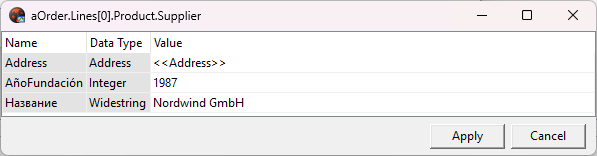
Название and AñoFundación are field names, not values.
This is the kind of thing that only works if every layer underneath agrees, from the editor to the serialiser. Building the tool on Delphi 13 is what made that straightforward.
# Nullable fields: empty is not zero
A nullable field has three states, not two. It can hold a value, it can hold a zero, or it can hold nothing at all.
Look at two lines in that log again:
```txt
Discount = 0
ShippedAt = nil
```
One of them was typed as a zero. The other was left alone. They arrived as two different things - which is exactly what your server and your database mean by them. "The discount is zero" and "no discount was recorded" are two different facts.
So if you ever wondered whether your server really handles a missing value the way you think it does, you can now check it in about fifteen seconds. No client needed.
# You can send a descendant structure
We wanted this one for years.
When you add an element to an array, you now pick its type from a list: the base structure, or any descendant of it. Two different descendants can sit next to each other in the same array, and your server receives the real type of each one, exactly as a real client would send it.
You can also change the type of a structure after it exists, without starting the request again.
That matters because your server branches on the type that arrived. Data Abstract does exactly this in GetData: the request comes in as a TableRequestInfo or as one of its descendants, and the type decides what the server reads and does next. Until now, that branch was out of reach from here - the most interesting path through your own server was the one you could not test.
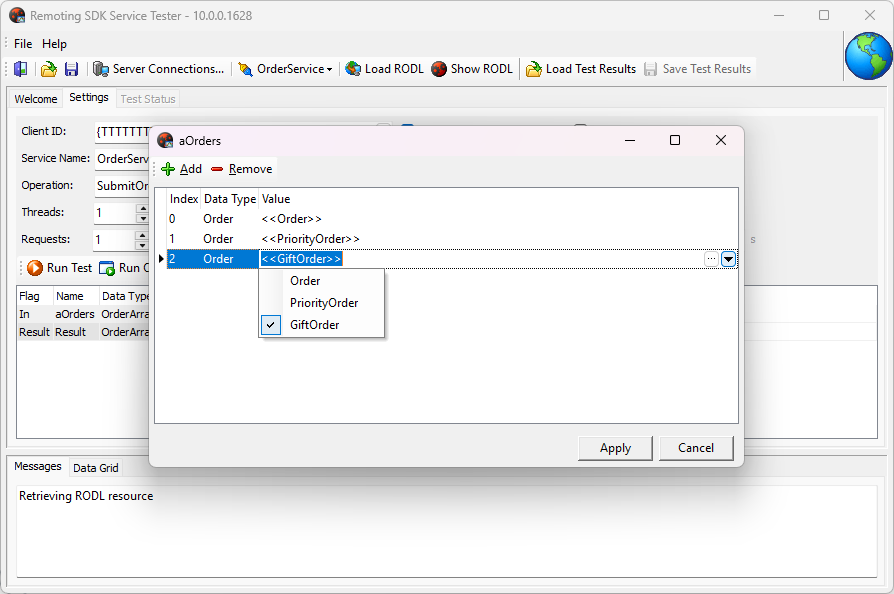
**Pick the descendant you want to send, element by element.*
The grid shows both: the declared type of the array element, and the type the element actually is. Send three of them at once, and this is what the server gets — the log below is trimmed to the lines that matter:
```txt
SubmitOrders: 3 element(s)
[0] type = Order
[0] Customer = "Acme Industrial"
[1] type = PriorityOrder
[1] Customer = "Nordic Supplies"
[1] Courier = "DHL Express"
[2] type = GiftOrder
[2] Customer = "Harper & Sons"
[2] GiftMessage = "Happy birthday!"
```
Three elements, one array, three different types. Courier and GiftMessage do not exist on the base structure at all, and they still arrived — which means the server really did receive the descendants, not the type the method was declared with.
# Empty values now look empty
A grid cell has to show something when a value is missing. Showing nothing is the one thing it must not do.
Ask a server for an empty record and look at what comes back:
```txt
(0 byte(s)) — a binary with nothing in it
(0 item(s)) — an array with no elements
<> — a string of zero length
<> — a value that is not there at all
```
Four different kinds of empty, and the grid shows each one differently. That matters more than it sounds. A server that returns an empty array and a server that returns null are not doing the same thing, and an empty string is a third answer again. This is where you are supposed to notice.
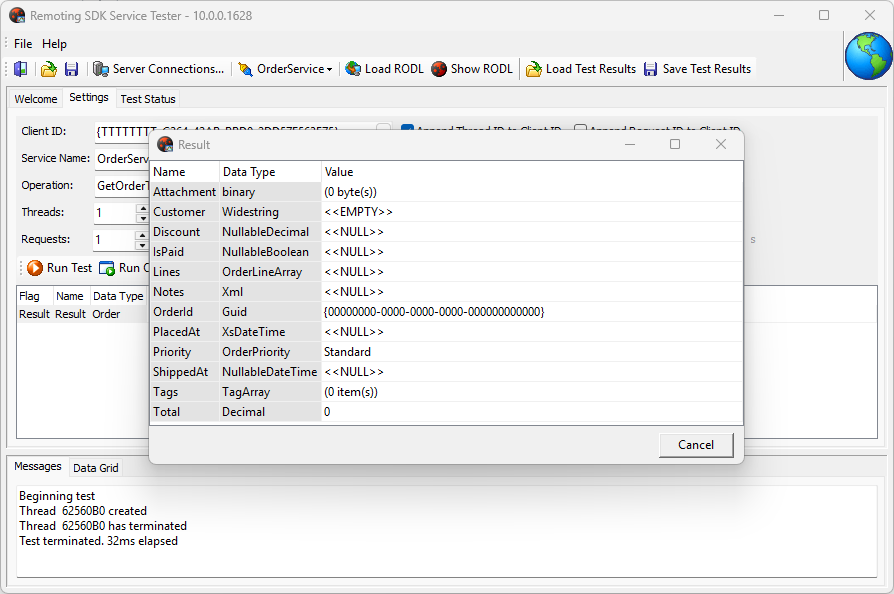
An empty binary, an empty array, an empty string and a null. Four different answers, four different cells.
# Since .1629
The new **Service Tester** ships in Remoting SDK and Data Abstract build .1629, coming next week, for .NET and Delphi. From this build on, calling a method takes no client project at all.
**Service Tester** connects to the server you are working on, reads its RODL, and sends the request - no proxy, no form, no line of client code.
That was always the idea. This is the release where it is true for every type and every shape of data you are likely to have.
And once one request works, the same window can do more. It can save the request as a file, run that file from a script, show a Data Abstract response as a table, and send a thousand calls at your server. That is the subject of the next post.
Coming next week, stay tuned!